Implementing Two-Factor Authentication: Messaging App Security
Implementing two-factor authentication (2FA) is vital for enhancing messaging app security, adding an essential layer of protection beyond just a password to safeguard your sensitive conversations and personal information from unauthorized access.
In an increasingly connected world, our messaging applications have become digital repositories of our most personal conversations, sensitive information, and even financial details. The thought of unauthorized access to these private spaces is unsettling, to say the least. That’s why implementing two-factor authentication: enhance messaging app security is no longer just an option, but a critical necessity for anyone serious about digital privacy and data protection.
understanding the critical need for 2FA in messaging
Messaging apps are integral to our daily lives, facilitating communication with friends, family, and colleagues. However, their pervasive use also makes them prime targets for cybercriminals seeking to exploit vulnerabilities and gain access to private data. Without robust security measures, a simple password can be the only barrier between your personal life and a malicious actor.
The digital landscape is fraught with threats, from phishing attempts to sophisticated brute-force attacks. A compromised messaging account can lead to identity theft, financial fraud, reputational damage, and the exposure of confidential information. This makes understanding and implementing advanced security protocols, like 2FA, absolutely essential for every user.
the rising tide of cyber threats
Cybercriminals are constantly evolving their tactics, making it harder for users to rely solely on basic password protection. Weak passwords, recycled passwords across multiple services, and even strong passwords can be circumvented through various attack vectors. The sheer volume of personal data exchanged through messaging apps makes them highly attractive targets.
- Phishing Attacks: Deceptive messages or emails designed to trick users into revealing login credentials.
- Malware and Spyware: Software installed without consent to monitor activity or steal data.
- Brute-Force Attacks: Automated attempts to guess passwords through trial and error.
- Credential Stuffing: Using leaked credentials from one service to try logging into others.
These threats underscore why an additional layer of security, beyond what a single password can offer, is indispensable. 2FA provides that crucial second line of defense, significantly complicating an attacker’s efforts even if they manage to obtain your primary password.
In conclusion, the fundamental role of messaging apps in our digital interactions necessitates a proactive approach to security. Recognizing the escalating cyber threats and the limitations of single-factor authentication is the first step towards adopting more resilient protection strategies like 2FA.
how two-factor authentication works
Two-factor authentication adds a second layer of verification to your login process, ensuring that even if someone knows your password, they cannot access your account without this additional piece of information. This significantly raises the bar for unauthorized access, making your messaging apps much more secure.
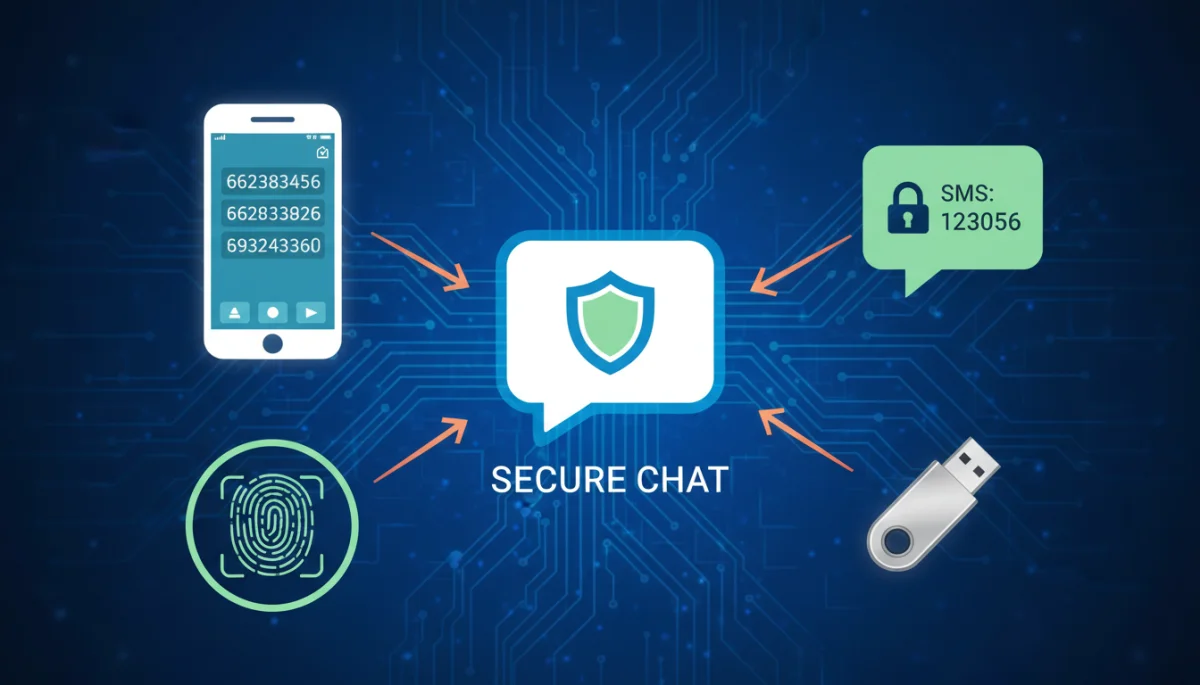
The core principle of 2FA relies on requiring two distinct types of evidence to verify a user’s identity. These typically fall into three categories: something you know (like a password), something you have (like a phone or security key), and something you are (like a fingerprint or facial scan). Combining two of these factors creates a much stronger authentication process.
the three factors of authentication
Understanding these factors helps in appreciating the robustness 2FA brings to security. Each factor offers a different kind of protection, and combining them creates a layered defense.
- Knowledge Factor: This is the most common factor and includes passwords, PINs, or security questions. It relies on information only the legitimate user is supposed to know.
- Possession Factor: This involves something the user physically possesses, such as a smartphone for receiving SMS codes, a dedicated hardware token, or an authenticator app.
- Inherence Factor: This is based on unique biological attributes of the user, such as fingerprints, facial recognition, or iris scans. These are often integrated into modern smartphones.
When you enable 2FA on a messaging app, the system will first verify your password (knowledge factor). Then, it will request a second form of verification, such as a code sent to your phone (possession factor) or a biometric scan (inherence factor). Only after both factors are successfully verified will access be granted.
This dual-factor approach ensures that even if a cybercriminal compromises one factor, they still cannot gain entry without the second. This makes account takeover attempts substantially more difficult and less likely to succeed, providing peace of mind for users concerned about their digital privacy.
In essence, 2FA transforms a single point of failure (your password) into a two-pronged defense, drastically reducing the risk of unauthorized access to your sensitive messaging data.
common 2FA methods for messaging apps
Various methods exist for implementing two-factor authentication, each offering different levels of convenience and security. Choosing the right method often depends on the specific messaging app’s offerings and your personal security preferences.
While some methods are more common and user-friendly, others provide a higher degree of protection. It’s important to understand the distinctions to make an informed decision about how to best secure your accounts.

popular 2FA options explained
Let’s delve into the most prevalent 2FA methods you’ll encounter and how they function to protect your messaging apps.
- SMS-based 2FA: After entering your password, a one-time code is sent via SMS to your registered phone number. You then enter this code into the app to complete login. While convenient, it’s susceptible to SIM-swapping attacks.
- Authenticator Apps: Applications like Google Authenticator or Authy generate time-based one-time passwords (TOTP) directly on your device. These codes refresh every 30-60 seconds and do not rely on cellular networks, making them more secure than SMS.
- Biometric Authentication: Many modern smartphones integrate fingerprint or facial recognition. After entering your password, you might be prompted to scan your finger or face for verification. This offers high convenience and security.
- Hardware Security Keys: Physical devices (e.g., YubiKey) that plug into your device or connect wirelessly. They provide the strongest form of 2FA as they are nearly impossible to compromise remotely.
Each method has its pros and cons, but all offer a significant upgrade over password-only authentication. Authenticator apps and hardware keys are generally considered more secure than SMS-based 2FA due to their resistance to specific types of cyberattacks.
Ultimately, the best 2FA method is the one you will consistently use. Even the most secure method offers no protection if it’s not enabled. Therefore, prioritize convenience enough to ensure consistent usage, while still aiming for the strongest practical security.
Understanding these common 2FA methods empowers users to select the most appropriate security layer for their messaging applications, balancing between ease of use and robust protection against evolving cyber threats.
step-by-step guide to enabling 2FA on popular messaging apps
Enabling two-factor authentication across your messaging apps is a straightforward process, though the exact steps may vary slightly depending on the platform. This guide provides a general overview of how to activate this crucial security feature on some widely used applications.
While specific menu names or button labels might differ, the underlying principle remains consistent: navigate to security or privacy settings and look for options related to two-step verification or 2FA. Always ensure your app is updated to its latest version to access all security features.
activating 2FA on whatsapp, telegram, and signal
Here’s a simplified breakdown of how to enable 2FA on some of the most popular messaging platforms:
- WhatsApp:
- Open WhatsApp and go to Settings (or three dots menu on Android).
- Tap ‘Account’ > ‘Two-step verification’ > ‘Enable’.
- You’ll be prompted to create a 6-digit PIN and confirm it.
- Optionally, add an email address for PIN reset in case you forget it.
- Telegram:
- Open Telegram and go to Settings (or three lines menu).
- Tap ‘Privacy and Security’ > ‘Two-Step Verification’.
- Set a strong password that will be required in addition to the SMS code.
- Provide a recovery email.
- Signal:
- Open Signal and go to Settings (or profile icon).
- Tap ‘Account’ > ‘Two-factor authentication’ (or ‘PIN’ on some versions).
- Create and confirm a numeric PIN. This PIN is used for registration lock.
- Remember this PIN, as Signal does not offer email recovery for it.
It’s crucial to choose strong, unique PINs or passwords for 2FA and, where applicable, provide a recovery email address. However, be mindful that email recovery introduces another potential attack vector if your email itself isn’t well-secured. For apps like Signal, where PIN recovery is not available, memorizing your PIN is paramount.
By following these steps, you can significantly bolster the security of your messaging accounts, adding a robust second layer of defense against unauthorized access. Regularly reviewing your security settings is also a good practice to ensure continuous protection.
best practices for maintaining messaging app security with 2FA
Enabling 2FA is a significant step, but maintaining robust messaging app security requires ongoing vigilance and adherence to best practices. Simply turning it on isn’t a set-it-and-forget-it solution; continuous attention is key.
Cybersecurity is an evolving field, and so too must our personal security habits. Implementing 2FA effectively means understanding how to use it optimally and what complementary measures can further strengthen your digital defenses.
optimizing your 2FA and overall security posture
To maximize the benefits of 2FA and ensure comprehensive messaging app security, consider these essential practices:
- Use Strong, Unique Passwords: Even with 2FA, your primary password should be complex and distinct for each account. Use a password manager to help create and store them securely.
- Prefer Authenticator Apps: Whenever possible, opt for authenticator apps over SMS-based 2FA. They are generally more secure against SIM-swapping and other phone number-based attacks.
- Secure Your Recovery Options: If your 2FA method has a recovery email or backup codes, ensure these are also highly secure. Your recovery email should have its own strong password and 2FA enabled.
- Beware of Phishing: Always be skeptical of unexpected messages asking for codes or login details. Verify the sender’s identity through an alternative, trusted channel before clicking links or sharing information.
- Regularly Update Apps: Keep your messaging apps and operating system updated. Software updates often include critical security patches that protect against newly discovered vulnerabilities.
- Review Connected Devices: Periodically check your messaging app settings for a list of connected devices and remove any unrecognized or old sessions.
These practices, when combined with 2FA, create a multi-layered defense system that significantly reduces your vulnerability to cyberattacks. A proactive and informed approach to security is your best defense in the digital realm.
By consistently applying these best practices, you can ensure that your messaging apps remain secure, protecting your private communications and personal data from the ever-present threats of the digital world.
the future of authentication: beyond traditional 2FA
While two-factor authentication represents a significant leap in digital security, the landscape of authentication is continuously evolving. Researchers and developers are exploring even more robust and user-friendly methods that move beyond traditional 2FA, aiming for a future with seamless yet impenetrable security.
The goal is to eliminate the friction often associated with current 2FA methods while simultaneously enhancing protection against increasingly sophisticated cyber threats. This involves leveraging advancements in biometrics, behavioral analytics, and decentralized identity solutions.
emerging authentication technologies and concepts
The next generation of authentication promises to be more intelligent and integrated, offering enhanced security with less user effort.
- Passwordless Authentication: This approach seeks to eliminate passwords entirely, relying instead on biometrics, security keys, or magic links. WebAuthn, a web authentication standard, is a key player in this movement.
- Adaptive Authentication: Also known as risk-based authentication, this system analyzes various contextual factors (e.g., location, device, time of day, user behavior) to determine the level of authentication required. If a login attempt seems suspicious, it might demand additional verification steps.
- Decentralized Identity: Utilizing blockchain technology, decentralized identity gives individuals more control over their personal data and how it’s shared. Users can prove their identity without relying on a central authority, enhancing privacy and security.
- Continuous Authentication: Instead of authenticating only at login, this method continuously verifies the user’s identity throughout a session using behavioral biometrics (e.g., typing patterns, mouse movements) and other background checks.
These innovations aim to address the limitations of current 2FA, such as susceptibility to social engineering for SMS codes or the inconvenience of carrying physical keys. The focus is shifting towards a more dynamic and context-aware security model that can adapt to changing threat landscapes and user behaviors.
The future of authentication is poised to offer a more secure and less intrusive experience, where security measures are seamlessly integrated into our digital interactions, making unauthorized access exceedingly difficult without constant user friction.
addressing common concerns and troubleshooting 2FA
Despite its benefits, users sometimes encounter issues or have concerns regarding 2FA. Addressing these proactively can help ensure a smooth and continuous security experience for your messaging apps.
Common concerns often revolve around losing access to a second factor, the perceived inconvenience, or understanding how to manage multiple 2FA-enabled accounts. Proper planning and knowledge can mitigate most of these potential headaches.
managing and resolving 2FA challenges
Here are some common concerns and troubleshooting tips for 2FA:
- Lost or Stolen Device: If your phone (the source of your 2FA codes) is lost or stolen, having a recovery email or backup codes is crucial. Store backup codes in a secure, offline location. Most apps allow you to generate new backup codes.
- Inconvenience of Codes: While an extra step, the security benefits far outweigh the minor inconvenience. Consider using authenticator apps that generate codes instantly on your device, or biometrics for faster access.
- SIM Swapping Attacks: To protect against SIM swapping (where an attacker transfers your phone number to their SIM card to receive SMS 2FA codes), avoid SMS-based 2FA where possible. Opt for authenticator apps or hardware keys instead. Also, set up a PIN on your mobile carrier account.
- Multiple Accounts: Use a dedicated authenticator app like Authy or Google Authenticator to manage 2FA for multiple services. Many password managers also integrate 2FA code generation.
- Forgetting PINs/Passwords: Always use the recovery options provided by the app (e.g., recovery email on WhatsApp or Telegram). For apps like Signal, where PIN recovery is not available, ensure you have a reliable way to remember your PIN, perhaps a secure password manager.
Regularly testing your 2FA setup by logging out and logging back in can also help identify any potential issues before they become critical. It’s better to discover a problem when you’re not under pressure to access your account immediately.
By understanding these common concerns and implementing the suggested troubleshooting steps, users can confidently navigate the use of 2FA, ensuring their messaging app security remains robust and accessible.
| Key Aspect | Brief Description |
|---|---|
| Core Function | Adds a second verification layer beyond passwords. |
| Key Methods | SMS, authenticator apps, biometrics, hardware keys. |
| Best Practice | Prefer authenticator apps; secure recovery options. |
| Future Trends | Passwordless, adaptive, and continuous authentication. |
Frequently Asked Questions About 2FA
Two-factor authentication (2FA) is essential because it adds a critical second layer of security beyond just a password. This protects your private conversations and sensitive data from unauthorized access, even if your primary password is compromised through phishing or other cyber threats.
The most secure 2FA methods include authenticator apps (like Google Authenticator or Authy) and hardware security keys. These methods are generally preferred over SMS-based 2FA due to their greater resistance to attacks like SIM swapping, providing a stronger defense.
While possible if you lose your second factor (e.g., phone, security key) without recovery options, it’s preventable. Always set up recovery emails or store backup codes securely. Most apps provide clear instructions for account recovery, ensuring you don’t get locked out.
SMS-based 2FA is still better than no 2FA at all, offering a significant security improvement over password-only access. However, it’s more vulnerable to SIM-swapping attacks. If other options like authenticator apps are available, they should be prioritized for enhanced security.
It’s advisable to review your 2FA settings periodically, ideally every few months or whenever you change devices or phone numbers. This ensures all recovery options are current and helps you stay informed about any new security features or recommendations from the app provider.
conclusion
In a digital world where our messaging apps hold a significant portion of our personal and professional lives, the importance of robust security cannot be overstated. Implementing two-factor authentication: enhance messaging app security is a fundamental step toward safeguarding your digital privacy. By adding an extra layer of verification, 2FA significantly reduces the risk of unauthorized access, protecting your sensitive conversations and data from cyber threats. While the future of authentication promises even more seamless and intelligent solutions, embracing and optimizing current 2FA methods remains paramount for every user aiming to maintain a secure online presence. Stay vigilant, stay updated, and make 2FA a non-negotiable part of your digital security strategy.
