Phishing Attacks on Messaging Platforms: Identify & Avoid Scams
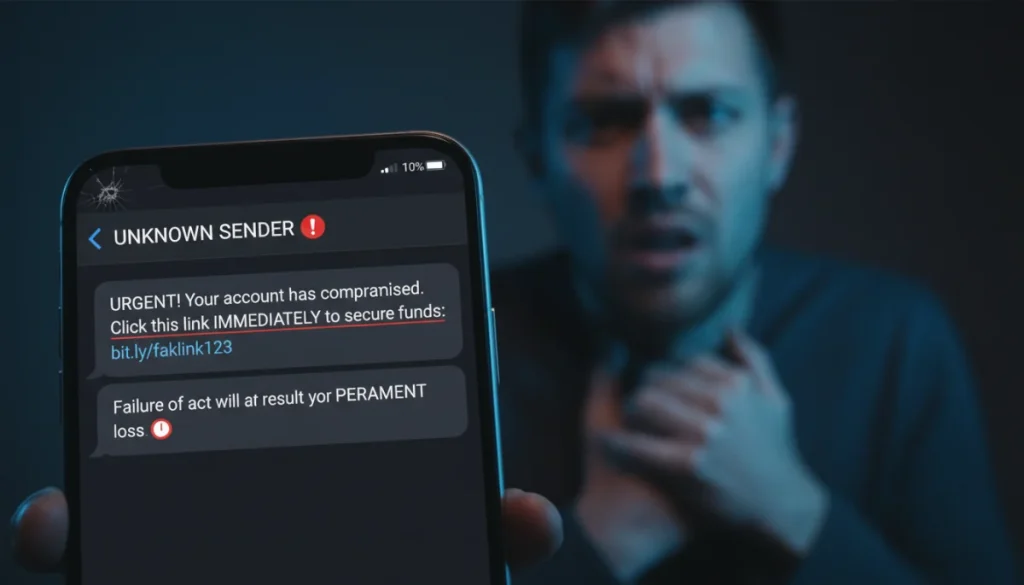
Phishing attacks on messaging platforms are sophisticated attempts by cybercriminals to steal personal information through deceptive messages, often mimicking trusted entities to trick users into revealing sensitive data or downloading malware.
In today’s interconnected world, messaging platforms have become indispensable for personal and professional communication. However, this convenience comes with a significant risk: the proliferation of phishing attacks on messaging platforms. Cybercriminals constantly evolve their tactics, making it crucial for users to understand how these scams work and, more importantly, how to protect themselves. This article will delve into the intricacies of phishing on messaging apps, equipping you with the knowledge to identify and avoid common scams.
Understanding the Landscape of Messaging App Phishing
Messaging applications like WhatsApp, Telegram, Signal, and even traditional SMS have become prime targets for cybercriminals. The intimate nature of these platforms, combined with the speed and perceived trustworthiness of direct messages, makes them fertile ground for phishing attempts. Unlike email phishing, which often has more robust filtering mechanisms, messages can slip through more easily, directly into your personal conversations.
Phishing on messaging platforms typically involves an attacker masquerading as a legitimate entity or individual to trick recipients into revealing sensitive information. This can range from login credentials and financial details to personal identification numbers. The sheer volume of daily interactions on these apps provides ample opportunities for fraudsters to cast a wide net, hoping to ensnare unsuspecting users.
The Evolution of Phishing Tactics
Early phishing attempts were often crude, characterized by obvious grammatical errors and generic requests. However, modern phishing attacks are far more sophisticated. Attackers now employ advanced social engineering techniques, creating highly convincing messages that mimic official communications from banks, government agencies, or even friends and family members. They leverage psychological triggers like urgency, fear, or greed to manipulate victims into immediate action.
Why Messaging Apps Are Vulnerable
Several factors contribute to the vulnerability of messaging apps. First, the instant and informal nature of these communications can lead users to lower their guard. Second, the prevalence of link sharing makes it easy for malicious URLs to propagate. Third, many users access these apps on mobile devices, where it can be harder to inspect links or verify sender identities thoroughly. Finally, the ability to quickly forward messages allows scams to spread rapidly through networks of contacts, amplifying their reach.
- Instant Communication: Users often respond quickly without full verification.
- Link Sharing Culture: Malicious links blend in easily with legitimate content.
- Mobile Device Challenges: Smaller screens and less robust security features.
- Network Effect: Scams spread quickly through contact lists.
Understanding these underlying vulnerabilities is the first step in building a robust defense against phishing attacks. Recognizing that these platforms are targeted, and why, helps in adopting a more cautious and scrutinizing approach to messages received.
Common Phishing Scenarios on Messaging Platforms
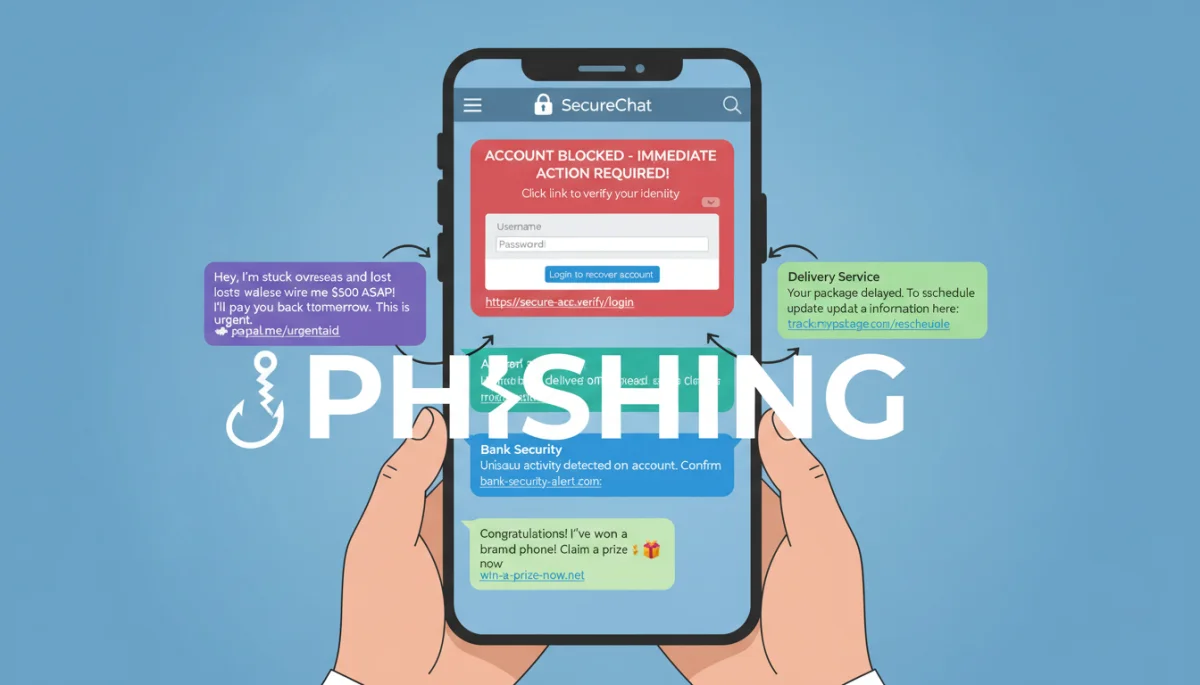
Phishing attacks come in many guises, but several common scenarios frequently appear on messaging platforms. Recognizing these patterns can significantly improve your ability to spot a scam before it causes harm. These scenarios exploit human psychology and leverage the convenience of messaging apps to their advantage.
Fake Account Takeover Alerts
One prevalent tactic involves messages claiming there’s a problem with your account (e.g., bank, social media, or even the messaging app itself). These messages often create a sense of urgency, stating that your account has been compromised or that suspicious activity has been detected. They will then prompt you to click a link to verify your identity or change your password. The link, however, leads to a fake login page designed to steal your credentials.
“Friend in Need” Scams
This type of scam preys on empathy. You might receive a message from a contact whose account has been compromised, claiming to be in an emergency and desperately needing money or personal information. They might ask you to transfer funds, buy gift cards, or share a verification code. Always verify such requests through an alternative communication channel, like a phone call, before acting.
Package Delivery and Shipping Notifications
With the rise of online shopping, fake delivery notifications have become a common phishing vector. You receive a message, often via SMS (smishing), stating there’s an issue with a package delivery, a missed delivery, or a need to pay a small fee to reschedule. The embedded link directs you to a fraudulent website that collects your personal and payment details. These messages often appear very convincing, complete with tracking numbers and company logos.
Investment and Get-Rich-Quick Schemes
Scammers also use messaging apps to promote fake investment opportunities, promising exorbitant returns with minimal risk. These schemes often start with an unsolicited message from an unknown number, gradually building trust before convincing victims to invest in non-existent ventures. The initial small returns might be paid out to build confidence, only for larger investments to disappear.
- Urgent Account Warnings: “Your account has been locked! Click here to verify.”
- Emergency Fund Requests: “I’m stuck overseas, send money immediately!”
- Fake Delivery Updates: “Your package is delayed, update shipping info here.”
- High-Return Investments: “Guaranteed 300% profit in a week, invest now!”
By understanding these common scenarios, users can develop a critical eye for suspicious messages. The key is to always question unexpected communications, especially those demanding immediate action or offering something too good to be true.
Red Flags: How to Identify a Phishing Message
Identifying a phishing message requires a keen eye and a healthy dose of skepticism. While scammers are becoming more sophisticated, several tell-tale signs can help you distinguish a genuine message from a malicious one. Developing an awareness of these red flags is crucial for protecting your digital footprint.
Unexpected or Unsolicited Messages
If you receive a message from an unknown sender or an unexpected message from a known contact that seems out of character, proceed with caution. Cybercriminals often initiate contact hoping to catch you off guard. Be wary of messages that arrive without context or prior interaction, especially if they contain links or requests for information.
Urgency and Threatening Language
Phishing messages frequently employ tactics that create a sense of urgency or fear. They might warn of immediate account suspension, legal action, or a limited-time offer that requires instant action. This pressure is designed to bypass rational thought and prompt an immediate, unverified response. Always question messages that demand quick decisions without allowing time for verification.
Suspicious Links and Attachments
This is perhaps the most critical red flag. Phishing messages almost always contain malicious links or attachments. Before clicking any link, hover over it (on a desktop) or long-press it (on mobile) to reveal the actual URL. Look for discrepancies between the displayed text and the actual destination. Malicious links often contain misspelled domain names, extra characters, or redirect to unfamiliar sites. Similarly, never open unexpected attachments from unknown senders.
Poor Grammar and Spelling
While phishing attacks have improved, many still contain grammatical errors, typos, or awkward phrasing. Legitimate organizations typically employ professional communication standards. Such errors can be a strong indicator that the message is not authentic. Always scrutinize the language used, even in seemingly minor details.
Requests for Personal Information
Legitimate organizations will rarely ask for sensitive information like passwords, credit card numbers, or Social Security numbers via unsolicited messages. If a message asks for this kind of data, it’s almost certainly a phishing attempt. Always navigate directly to the official website or app to provide such information, rather than clicking a link in a message.
- Unusual Sender: Messages from unknown numbers or out-of-character contacts.
- High Pressure: “Act now or lose access!” or “Limited-time offer!”
- Deceptive URLs: Links that don’t match the sender or contain suspicious characters.
- Language Errors: Typos, poor grammar, or unnatural phrasing.
- Sensitive Data Requests: Asking for passwords, PINs, or full credit card details.
By learning to recognize these red flags, you can significantly reduce your susceptibility to phishing scams. A cautious and critical approach to every message received is your best defense against these evolving threats.
Best Practices for Preventing Phishing Attacks
Proactive prevention is the most effective strategy against phishing attacks on messaging platforms. Implementing a few key best practices can significantly reduce your risk of falling victim to these pervasive scams. These strategies focus on enhancing your digital hygiene and fostering a skeptical mindset.
Enable Two-Factor Authentication (2FA)
Two-factor authentication adds an extra layer of security to your accounts. Even if a phisher manages to steal your password, they won’t be able to access your account without the second factor, typically a code sent to your phone or generated by an authenticator app. Enable 2FA on all your critical accounts, including messaging apps, email, and banking services.
Verify Sender Identity
Always verify the identity of the sender, especially if the message contains unusual requests or links. If a message from a friend seems suspicious, contact them through a different channel (e.g., a phone call or a separate email) to confirm its legitimacy. For messages from organizations, do not use the contact information provided in the suspicious message; instead, use official contact details from their website or a trusted source.
Inspect Links Carefully
Before clicking any link, take a moment to inspect it. On mobile, long-press the link to see the full URL. On a desktop, hover your mouse over the link. Look for anything that seems off: misspellings, extra characters, or domains that don’t match the expected source. If in doubt, do not click the link. Instead, manually type the known legitimate URL into your browser.
Keep Software Updated
Regularly update your operating system, messaging apps, and security software. Updates often include critical security patches that protect against newly discovered vulnerabilities that phishers might exploit. Running outdated software leaves you exposed to known threats, making it easier for attackers to compromise your device or accounts.
Be Skeptical of Urgent or Emotional Appeals
Phishers often rely on emotional manipulation. Messages that create a sense of extreme urgency, fear, or an offer that seems too good to be true are almost always suspicious. Take a moment to pause and evaluate the message critically. If it pressures you to act immediately without thinking, it’s likely a scam. Your rational judgment is your strongest defense against these psychological tricks.
- 2FA Everywhere: Secure accounts with an extra layer of verification.
- Cross-Verify Senders: Confirm unusual requests via alternative channels.
- Link Scrutiny: Always check URLs before clicking; use official sites directly.
- Software Hygiene: Keep all apps and OS updated for latest security patches.
- Emotional Detachment: Resist urgent or fear-inducing messages.
By consistently applying these best practices, you can significantly fortify your defenses against phishing attempts on messaging platforms, transforming yourself from a potential victim into a vigilant and secure user.
What to Do if You Suspect a Phishing Attack
Even with the best preventative measures, you might still encounter a suspicious message. Knowing how to react effectively if you suspect a phishing attack is just as important as knowing how to prevent one. Your actions can prevent data breaches, financial loss, and further spread of the scam.
Do Not Click, Reply, or Download
The most immediate and crucial step is to avoid interacting with the suspicious message. Do not click on any links, reply to the sender, or download any attachments. Engaging with the message in any way can inadvertently confirm your active status to the scammer, potentially leading to more targeted attacks, or worse, initiating a malicious download.
Report the Phishing Attempt
Most messaging platforms have built-in features to report spam or suspicious messages. Use these features to flag the message. Reporting helps the platform identify and block malicious actors, protecting other users. You can also forward the message to your service provider or relevant authorities. For example, in the U.S., you can report phishing to the Anti-Phishing Working Group (APWG) or the Federal Trade Commission (FTC).
Block the Sender
After reporting, block the sender to prevent them from sending you further messages. This adds another layer of protection, ensuring they cannot continue to target you through that specific account. While it won’t stop them from creating new accounts, it minimizes immediate exposure.
Change Compromised Passwords Immediately
If you accidentally clicked a link and entered your credentials on a suspicious site, assume your account is compromised. Immediately change your password for that account and any other accounts where you use the same password. Enable two-factor authentication if you haven’t already. Monitor your accounts for any unusual activity.
Inform Your Contacts
If the phishing message appears to come from a known contact, inform them immediately through an alternative, secure channel. Their account might have been compromised, and warning them can help them secure their account and prevent the scam from spreading further through their network. This collective awareness is vital in combating widespread phishing campaigns.
- Isolate the Threat: Do not interact with suspicious links or attachments.
- Official Reporting: Use platform features and report to authorities.
- Sender Block: Prevent further contact from the malicious sender.
- Password Reset: Change credentials if compromise is suspected, enable 2FA.
- Community Alert: Warn friends/family if their account seems compromised.
Acting swiftly and decisively when you suspect a phishing attack can mitigate potential damage and contribute to a safer digital environment for everyone. Your response is a critical part of the overall defense mechanism.
Protecting Your Family and Friends from Phishing
Cybersecurity isn’t just about protecting yourself; it’s also about safeguarding your loved ones. Educating your family and friends about the dangers of phishing attacks on messaging platforms is a crucial step towards creating a more secure digital community. Sharing knowledge and fostering good habits can prevent widespread victimization.
Educate About Common Scams
Share information about the most prevalent phishing scenarios, such as fake account alerts, “friend in need” scams, and package delivery notifications. Explain how these scams work and the psychological tricks they employ. The more informed your family and friends are, the better equipped they will be to recognize and avoid these threats. Regular, informal conversations about new scam trends can be highly effective.
Emphasize Link Verification
Teach them the importance of verifying links before clicking. Demonstrate how to hover over a link on a computer or long-press on a mobile device to reveal the true URL. Explain what to look for in a suspicious URL, such as misspellings or unexpected domain names. Stress that it’s always safer to navigate directly to a website rather than clicking a link in an unsolicited message.
Promote Two-Factor Authentication (2FA)
Encourage everyone to enable 2FA on all their important accounts, particularly email, banking, and social media. Explain that 2FA provides a critical second layer of defense, even if a password is stolen. Offer to help them set it up if they are unfamiliar with the process, making it as easy as possible for them to adopt this essential security measure.
Create a “Safe Word” for Urgent Requests
For highly sensitive or urgent requests from close contacts (e.g., asking for money in an emergency), establish a “safe word” or phrase that only you and that person know. If you receive an urgent request that doesn’t include the safe word, you’ll know it’s a scam. This simple trick can be incredibly effective against “friend in need” scams, where accounts are often impersonated or taken over.
Lead by Example
Your own cybersecurity habits can influence those around you. Practice what you preach: use strong, unique passwords, enable 2FA, and be cautious with links. When your family and friends see you taking security seriously, they are more likely to adopt similar habits. Make cybersecurity a regular topic of conversation, not just a response to a crisis.
Protecting your digital circle requires ongoing effort and open communication. By proactively sharing knowledge and encouraging best practices, you can significantly enhance the collective security of your family and friends against the ever-present threat of phishing attacks.
The Future of Phishing and Advanced Defenses
As technology evolves, so do the methods of cybercriminals. The future of phishing attacks on messaging platforms will likely see even more sophisticated techniques, requiring users and security providers to constantly adapt. Understanding these trends can help prepare us for the next wave of digital threats.
AI-Powered Phishing
Artificial intelligence (AI) and machine learning (ML) are already being leveraged by phishers to create highly personalized and convincing attacks. AI can generate text that is virtually indistinguishable from human writing, making it harder to spot grammatical errors or awkward phrasing. It can also analyze vast amounts of data to craft messages tailored to individual victims, increasing the likelihood of success. We can expect more deepfake voice and video messages, mimicking trusted individuals to solicit information or funds.
Next-Generation Messaging Security
In response, messaging platforms are continually enhancing their security features. This includes more advanced AI-driven spam and phishing detection, real-time link scanning, and improved user reporting mechanisms. End-to-end encryption, while protecting message content, does not inherently prevent phishing, so platforms must focus on identifying malicious intent before messages even reach the user’s inbox.
Quantum Computing and Cryptography
While still in its nascent stages, quantum computing poses both a threat and a potential solution. Quantum computers could theoretically break many of today’s encryption standards, necessitating the development of post-quantum cryptography. This shift will be critical for maintaining the security of messaging platforms against future, more powerful adversaries.
User Education as a Continuous Process
Ultimately, human vigilance remains the most crucial defense. As phishing evolves, so too must user education. This means ongoing awareness campaigns, training programs, and readily accessible resources that keep individuals informed about the latest threats and best practices. The emphasis will be on critical thinking, skepticism, and continuous learning, rather than relying solely on technological solutions.
- AI-Generated Scams: Expect more realistic and personalized phishing attempts.
- Platform Enhancements: AI-driven detection, real-time link analysis.
- Quantum Preparedness: Development of post-quantum cryptographic standards.
- Ongoing User Training: Continuous education on evolving threats and defenses.
The battle against phishing is a perpetual one, but by staying informed, leveraging advanced security tools, and fostering a culture of cybersecurity awareness, we can collectively build a more resilient defense against the sophisticated attacks of tomorrow.
| Key Aspect | Brief Description |
|---|---|
| Common Scams | Fake alerts, friend-in-need, delivery notices, and investment schemes are prevalent. |
| Identifying Red Flags | Look for urgency, suspicious links, poor grammar, and unsolicited requests for data. |
| Prevention Tips | Enable 2FA, verify senders, inspect links, keep software updated, and be skeptical. |
| Responding to Attacks | Do not interact, report, block sender, change compromised passwords, and inform contacts. |
Frequently Asked Questions About Messaging Phishing
Phishing on messaging platforms involves cybercriminals using deceptive messages, often impersonating trusted sources, to trick users into revealing sensitive information like passwords or financial details. These attacks exploit the direct and immediate nature of chat apps to gain unauthorized access.
Look for red flags such as unexpected messages, urgent or threatening language, suspicious links (check URLs carefully), poor grammar or spelling, and requests for personal information. Always verify the sender’s identity through an alternative communication channel if unsure.
Yes, 2FA is highly effective. Even if a phisher obtains your password, they cannot access your account without the second factor, typically a code sent to your phone or generated by an authenticator app. It adds a critical layer of security to your accounts.
If you clicked a phishing link, immediately close the page. If you entered any credentials, change that password and any identical passwords on other accounts. Report the incident to the platform and consider running a malware scan on your device.
Educate them about common scams, teach them how to verify links, encourage 2FA adoption, and consider establishing a “safe word” for urgent requests. Leading by example with strong cybersecurity habits also helps foster a more secure environment for everyone.
Conclusion: Staying Vigilant in a Connected World
The pervasive nature of messaging platforms, while offering unparalleled convenience, also presents a fertile ground for cybercriminals to launch sophisticated phishing attacks. As we’ve explored, these scams are constantly evolving, leveraging social engineering and technological advancements to trick unsuspecting users. However, by understanding the common tactics, recognizing red flags, and implementing robust prevention strategies, individuals can significantly bolster their defenses.
The key to navigating this complex digital landscape lies in a combination of proactive measures and informed reactions. Enabling two-factor authentication, rigorously verifying sender identities, meticulously inspecting links, and keeping software updated are not just best practices, but essential habits for digital survival. Furthermore, fostering a culture of skepticism towards unsolicited or urgent requests can empower users to make safer decisions.
Beyond personal protection, educating family and friends about these threats is crucial for building a resilient digital community. As phishing continues to adapt, so too must our collective awareness and readiness. By staying vigilant, informed, and proactive, we can collectively minimize the impact of phishing attacks on messaging platforms, ensuring our digital interactions remain secure and trustworthy.
